Closing the Loop: One Impressive AI Coding Agent Session for Y-Combinator

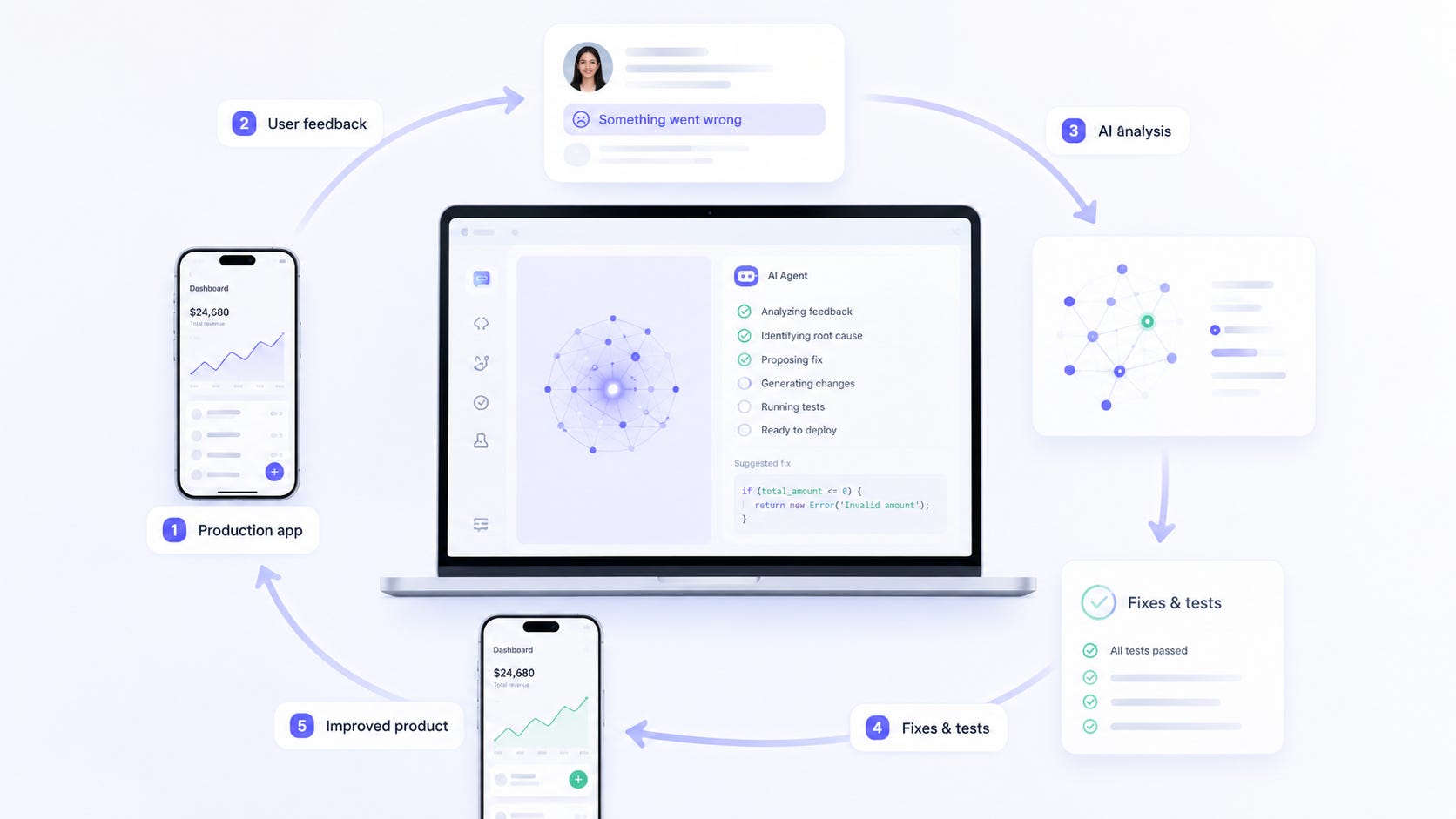
This year, Y-Combinator tried something new. They added an experimental question to all batch applications: attach your most impressive session working with an AI coding agent on your product:
I was excited to see this question because, for our Summer 2026 batch submission, I had something very relevant to show.
At that moment, it was a few weeks after we had released the Tiny Bridge’s Choice Boards app to real users. It was a soft launch just for a few families to try, but we already had a history of production usage and a built-in, integrated feedback loop directly in the product.
This was my first application created with the mindset of closing the loop between production usage, user feedback, production logs, and AI-assisted engineering, allowing continuous AI-driven development informed by live production data from day 0.
Closing the Loop
When working with AI coding agents, one of the biggest limitations is visibility.
The agent can inspect the codebase, your GitHub, documentation, organizational knowledge, and publicly available knowledge. But typically, it does not know what users are actually doing with the product day-to-day. It does not see where people get stuck, what feedback they submit, what errors happen, or what the actual user experience looks like.
This creates a gap between the product reality and the source-code-informed coding session.
Closing that gap initiates a much stronger feedback loop between production, product development, and engineering. Before the product launch, I instrumented three main things:
Persistent error logging in production, accessible to AI through an API and email integration.
An omnipresent feedback button across the app UI, available on all screens and views, that captures an in-app screenshot with user annotations and written or dictated feedback, supplementing it under the hood with the most recent logs and errors from the user session.
Production Errors
Every time an error happens in the app, it is logged on the server in a database that an AI agent can access remotely. Every new type of error is also sent by email to an inbox that the AI coding agent can access periodically.
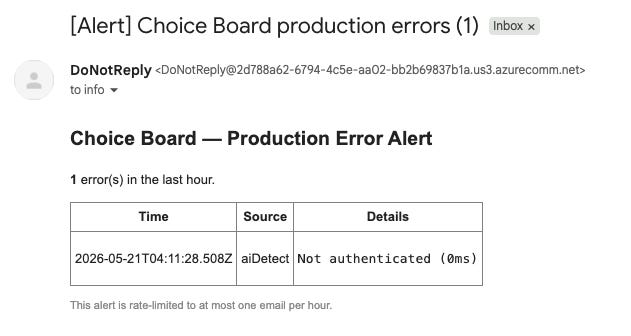
This means the agent does not have to rely only on what I manually tell it. It can inspect real production errors directly and use them autonomously as part of the development session.
User Feedback
Every screen in Tiny Bridge has a feedback button.
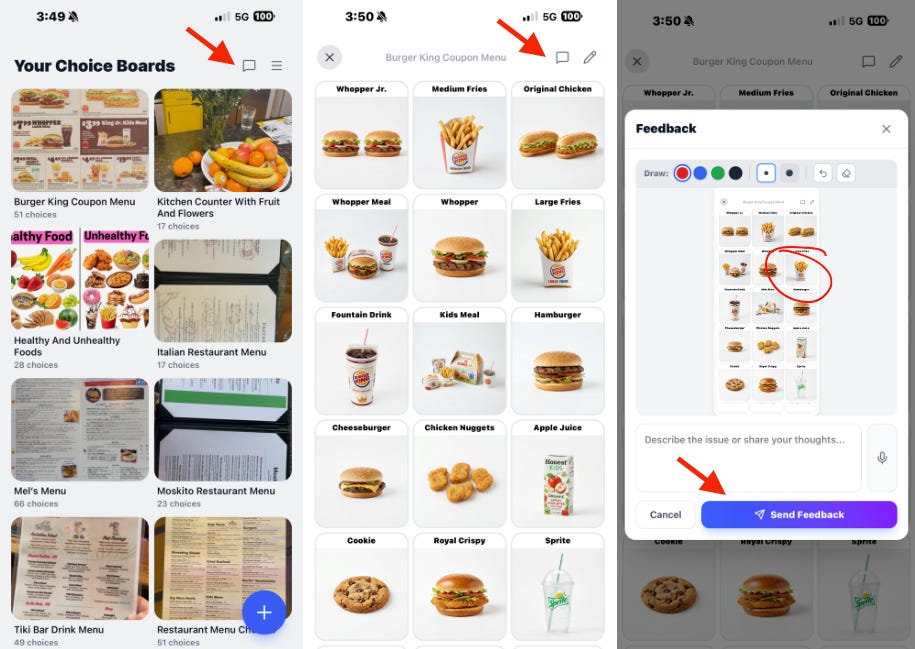
When a user presses it, the app captures a screenshot of the current app state. The user can mark things directly on the screenshot and then type or dictate a feedback message.
Under the hood, the app also collects and attaches recent session information, including logs and errors associated with that user session.
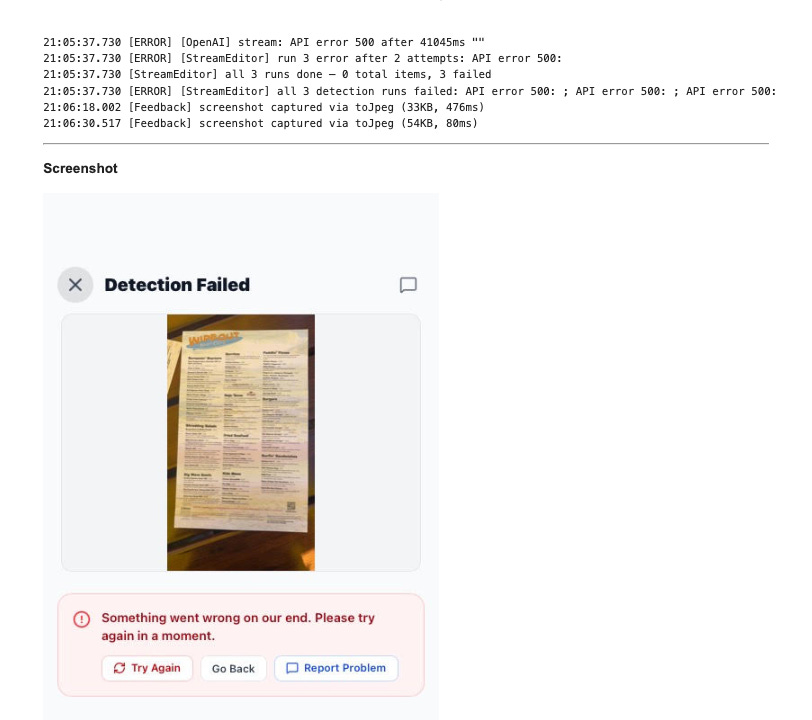
This turns a simple feedback message into something much more useful.
Instead of getting only “something is broken,” the system captures what the user saw, what they marked up, what they said, and what happened technically around that moment.
That gives the AI coding agent a much better context for understanding the issue.
The Self-Healing Session
For our YC submission, I recorded a session where I asked the AI coding agent to use the information it already had available to improve the application.
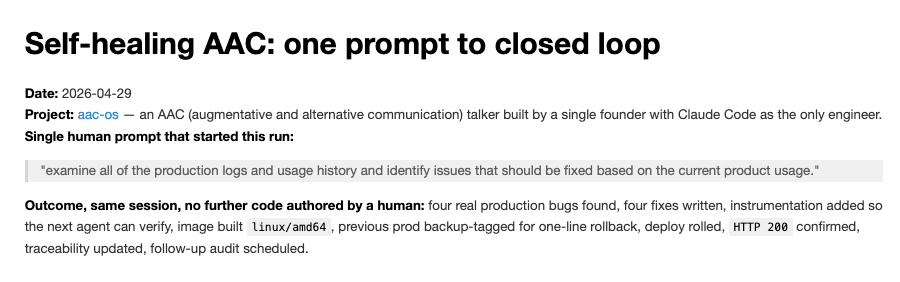
Prompt: “examine all of the production logs and usage history and identify issues that should be fixed based on the current product usage.”
The agent pulled new production errors and recent user feedback instances. It analyzed them, identified relevant issues, and made four product enhancements based on that information.
After implementing the changes, it tested them, verified them with data tracing points, and deployed the fixes to staging for more comprehensive testing.
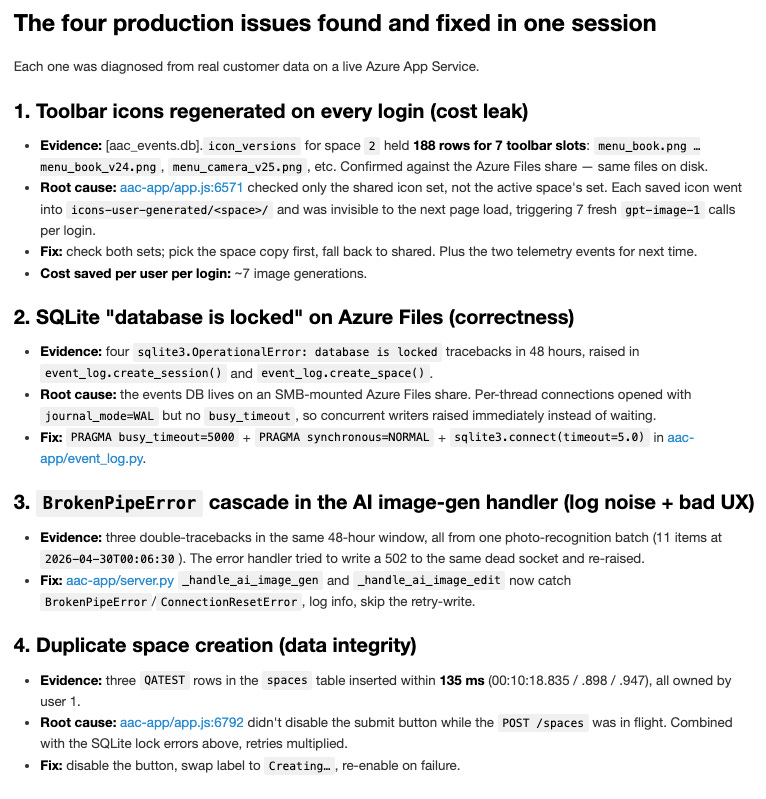
The whole session resulted in four fixes and took around 30 minutes.
The important part is that the agent did this using real production context. I did not need to manually create a detailed bug report or explain every issue from scratch. The product had already collected enough information for the agent to understand what needed attention.
Lastly, all learnings, decisions, and changes from the session were logged with product traceability, so that next time, when an AI agent builds something new, it can recall and understand what was changed, why it was changed, what feedback or error triggered the change, and what should be remembered for future sessions. As a result, it can prevent repeating the same mistake and truly close the autonomous agentic product development loop.
Raw Session Log
# Self-healing AAC: one prompt to closed loop

**Date:** 2026-04-29
**Project:** [aac-os](.) — an AAC (augmentative and alternative communication) talker built by a single founder with Claude Code as the only engineer.
**Single human prompt that started this run:**

> "examine all of the production logs and usage history and identify issues that should be fixed based on the current product usage."

**Outcome, same session, no further code authored by a human:** four real production bugs found, four fixes written, instrumentation added so the next agent can verify, image built `linux/amd64`, previous prod backup-tagged for one-line rollback, deploy rolled, `HTTP 200` confirmed, traceability updated, follow-up audit scheduled.

---

## The closed loop, made concrete

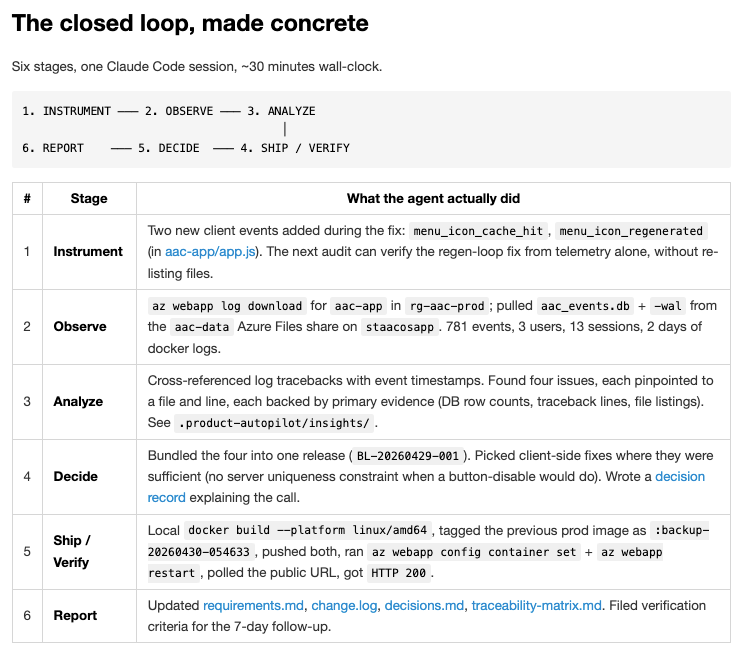
Six stages, one Claude Code session, ~30 minutes wall-clock.

```
1. INSTRUMENT ─── 2. OBSERVE ─── 3. ANALYZE
                                      │
6. REPORT    ─── 5. DECIDE  ─── 4. SHIP / VERIFY
```

| # | Stage | What the agent actually did |
|---|---|---|
| 1 | **Instrument** | Two new client events added during the fix: `menu_icon_cache_hit`, `menu_icon_regenerated` (in [aac-app/app.js](aac-app/app.js)). The next audit can verify the regen-loop fix from telemetry alone, without re-listing files. |
| 2 | **Observe** | `az webapp log download` for `aac-app` in `rg-aac-prod`; pulled `aac_events.db` + `-wal` from the `aac-data` Azure Files share on `staacosapp`. 781 events, 3 users, 13 sessions, 2 days of docker logs. |
| 3 | **Analyze** | Cross-referenced log tracebacks with event timestamps. Found four issues, each pinpointed to a file and line, each backed by primary evidence (DB row counts, traceback lines, file listings). See [`.product-autopilot/insights/`](.product-autopilot/). |
| 4 | **Decide** | Bundled the four into one release (`BL-20260429-001`). Picked client-side fixes where they were sufficient (no server uniqueness constraint when a button-disable would do). Wrote a [decision record](decisions.md) explaining the call. |
| 5 | **Ship / Verify** | Local `docker build --platform linux/amd64`, tagged the previous prod image as `:backup-20260430-054633`, pushed both, ran `az webapp config container set` + `az webapp restart`, polled the public URL, got `HTTP 200`. |
| 6 | **Report** | Updated [requirements.md](requirements.md), [change.log](change.log), [decisions.md](decisions.md), [traceability-matrix.md](traceability-matrix.md). Filed verification criteria for the 7-day follow-up. |

---

## The four production issues found and fixed in one session

Each one was diagnosed from real customer data on a live Azure App Service.

### 1. Toolbar icons regenerated on every login (cost leak)

- **Evidence:** [aac_events.db].`icon_versions` for space `2` held **188 rows for 7 toolbar slots**: `menu_book.png … menu_book_v24.png`, `menu_camera_v25.png`, etc. Confirmed against the Azure Files share — same files on disk.
- **Root cause:** [aac-app/app.js:6571](aac-app/app.js#L6571) checked only the shared icon set, not the active space's set. Each saved icon went into `icons-user-generated/<space>/` and was invisible to the next page load, triggering 7 fresh `gpt-image-1` calls per login.
- **Fix:** check both sets; pick the space copy first, fall back to shared. Plus the two telemetry events for next time.
- **Cost saved per user per login:** ~7 image generations.

### 2. SQLite "database is locked" on Azure Files (correctness)

- **Evidence:** four `sqlite3.OperationalError: database is locked` tracebacks in 48 hours, raised in `event_log.create_session()` and `event_log.create_space()`.
- **Root cause:** the events DB lives on an SMB-mounted Azure Files share. Per-thread connections opened with `journal_mode=WAL` but no `busy_timeout`, so concurrent writers raised immediately instead of waiting.
- **Fix:** `PRAGMA busy_timeout=5000` + `PRAGMA synchronous=NORMAL` + `sqlite3.connect(timeout=5.0)` in [aac-app/event_log.py](aac-app/event_log.py).

### 3. `BrokenPipeError` cascade in the AI image-gen handler (log noise + bad UX)

- **Evidence:** three double-tracebacks in the same 48-hour window, all from one photo-recognition batch (11 items at `2026-04-30T00:06:30`). The error handler tried to write a 502 to the same dead socket and re-raised.
- **Fix:** [aac-app/server.py](aac-app/server.py) `_handle_ai_image_gen` and `_handle_ai_image_edit` now catch `BrokenPipeError`/`ConnectionResetError`, log info, skip the retry-write.

### 4. Duplicate space creation (data integrity)

- **Evidence:** three `QATEST` rows in the `spaces` table inserted within **135 ms** (00:10:18.835 / .898 / .947), all owned by user 1.
- **Root cause:** [aac-app/app.js:6792](aac-app/app.js#L6792) didn't disable the submit button while the `POST /spaces` was in flight. Combined with the SQLite lock errors above, retries multiplied.
- **Fix:** disable the button, swap label to `Creating…`, re-enable on failure.

---

## What "ingesting customer feedback" looks like in practice

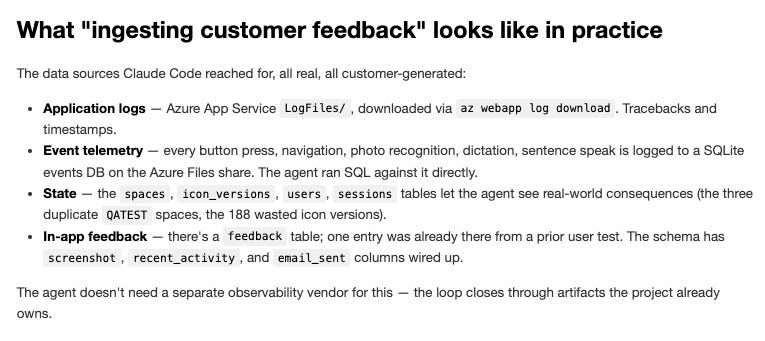
The data sources Claude Code reached for, all real, all customer-generated:

- **Application logs** — Azure App Service `LogFiles/`, downloaded via `az webapp log download`. Tracebacks and timestamps.
- **Event telemetry** — every button press, navigation, photo recognition, dictation, sentence speak is logged to a SQLite events DB on the Azure Files share. The agent ran SQL against it directly.
- **State** — the `spaces`, `icon_versions`, `users`, `sessions` tables let the agent see real-world consequences (the three duplicate `QATEST` spaces, the 188 wasted icon versions).
- **In-app feedback** — there's a `feedback` table; one entry was already there from a prior user test. The schema has `screenshot`, `recent_activity`, and `email_sent` columns wired up.


The agent doesn't need a separate observability vendor for this — the loop closes through artifacts the project already owns.

---

## Where the human stayed in the loop (and where they didn't)

Honest accounting:

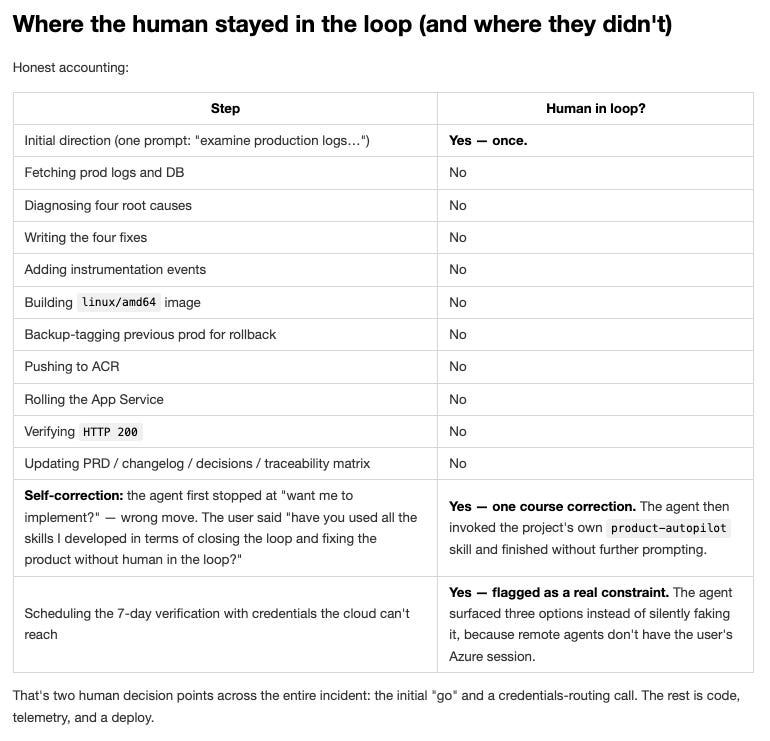
| Step | Human in loop? |
|---|---|
| Initial direction (one prompt: "examine production logs…") | **Yes — once.** |
| Fetching prod logs and DB | No |
| Diagnosing four root causes | No |
| Writing the four fixes | No |
| Adding instrumentation events | No |
| Building `linux/amd64` image | No |
| Backup-tagging previous prod for rollback | No |
| Pushing to ACR | No |
| Rolling the App Service | No |
| Verifying `HTTP 200` | No |
| Updating PRD / changelog / decisions / traceability matrix | No |
| **Self-correction:** the agent first stopped at "want me to implement?" — wrong move. The user said "have you used all the skills I developed in terms of closing the loop and fixing the product without human in the loop?" | **Yes — one course correction.** The agent then invoked the project's own `product-autopilot` skill and finished without further prompting. |
| Scheduling the 7-day verification with credentials the cloud can't reach | **Yes — flagged as a real constraint.** The agent surfaced three options instead of silently faking it, because remote agents don't have the user's Azure session. |

That's two human decision points across the entire incident: the initial "go" and a credentials-routing call. The rest is code, telemetry, and a deploy.

---

## Self-verification scheduled

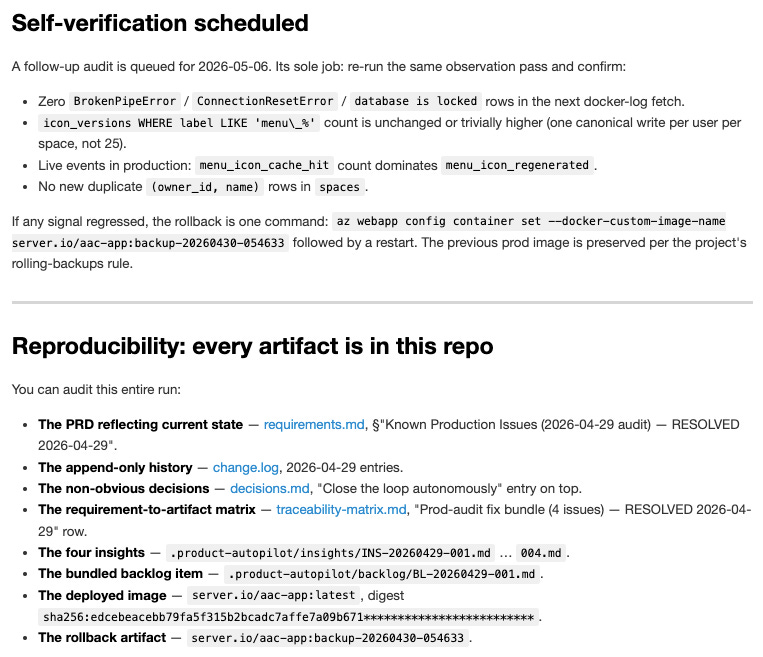
A follow-up audit is queued for 2026-05-06. Its sole job: re-run the same observation pass and confirm:

- Zero `BrokenPipeError` / `ConnectionResetError` / `database is locked` rows in the next docker-log fetch.
- `icon_versions WHERE label LIKE 'menu\_%'` count is unchanged or trivially higher (one canonical write per user per space, not 25).
- Live events in production: `menu_icon_cache_hit` count dominates `menu_icon_regenerated`.
- No new duplicate `(owner_id, name)` rows in `spaces`.

If any signal regressed, the rollback is one command: `az webapp config container set --docker-custom-image-name server.io/aac-app:backup-20260430-054633` followed by a restart. The previous prod image is preserved per the project's rolling-backups rule.

---

## Reproducibility: every artifact is in this repo

You can audit this entire run:

- **The PRD reflecting current state** — [requirements.md](requirements.md), §"Known Production Issues (2026-04-29 audit) — RESOLVED 2026-04-29".
- **The append-only history** — [change.log](change.log), 2026-04-29 entries.
- **The non-obvious decisions** — [decisions.md](decisions.md), "Close the loop autonomously" entry on top.
- **The requirement-to-artifact matrix** — [traceability-matrix.md](traceability-matrix.md), "Prod-audit fix bundle (4 issues) — RESOLVED 2026-04-29" row.
- **The four insights** — [`.product-autopilot/insights/INS-20260429-001.md`](.product-autopilot/insights/INS-20260429-001.md) … `004.md`.
- **The bundled backlog item** — [`.product-autopilot/backlog/BL-20260429-001.md`](.product-autopilot/backlog/BL-20260429-001.md).
- **The deployed image** — `server.io/aac-app:latest`, digest `sha256:edcebeacebb79fa5f315b2bcadc7affe7a09b671*************************`.
- **The rollback artifact** — `server.io/aac-app:backup-20260430-054633`.

---

## Why this matters for a one-person company

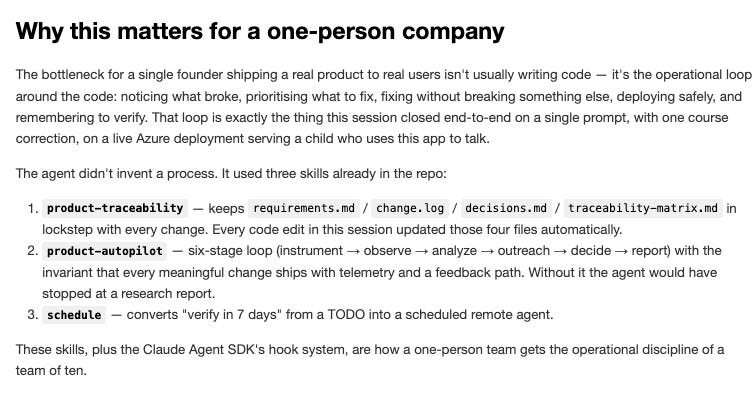
The bottleneck for a single founder shipping a real product to real users isn't usually writing code — it's the operational loop around the code: noticing what broke, prioritising what to fix, fixing without breaking something else, deploying safely, and remembering to verify. That loop is exactly the thing this session closed end-to-end on a single prompt, with one course correction, on a live Azure deployment serving a child who uses this app to talk.

The agent didn't invent a process. It used three skills already in the repo:

1. **`product-traceability`** — keeps `requirements.md` / `change.log` / `decisions.md` / `traceability-matrix.md` in lockstep with every change. Every code edit in this session updated those four files automatically.
2. **`product-autopilot`** — six-stage loop (instrument → observe → analyze → outreach → decide → report) with the invariant that every meaningful change ships with telemetry and a feedback path. Without it the agent would have stopped at a research report.
3. **`schedule`** — converts "verify in 7 days" from a TODO into a scheduled remote agent.

These skills, plus the Claude Agent SDK's hook system, are how a one-person team gets the operational discipline of a team of ten.